Instagram has a new feature called Instants, and it is worth understanding because it changes who you share with and how those photos behave after you hit send. This guide is based on Meta's official Instants announcement and the controls Instagram describes for the feature.
Here is the short version: Instagram Instants are real-time, disappearing photos you share with Close Friends or followers you follow back. You take a photo, send it, and it vanishes after they open it. Gone in 24 hours no matter what.
This guide covers how Instants work, who can see them, the screenshot situation, and how they compare with Stories, Snapchat, and BeReal.
What are Instagram Instants?
Instants is straightforward. Open the camera, take a photo right now, add a caption if you want, and send it to a smaller circle. According to Meta, you cannot upload from your camera roll, and there are no filters, stickers, or edits beyond a caption. The point is to share a moment, not to create content.
Instants borrows from a few familiar ideas:
- Snapchat's disappearing photo: open it and it is gone
- BeReal's authenticity push: no edits, shoot it now
- Close Friends' private circle: not for everyone
- Private messaging's intimacy: meant for a smaller audience
Instants is not just Stories with a new name. Stories are built for broadcasting. Instants are built for quick, private sharing. Stories sit at the top of Instagram for all your followers, with a full editing stack. Instants are smaller, more immediate, and meant for a close circle.
How do Instagram Instants work?
The flow takes about ten seconds:
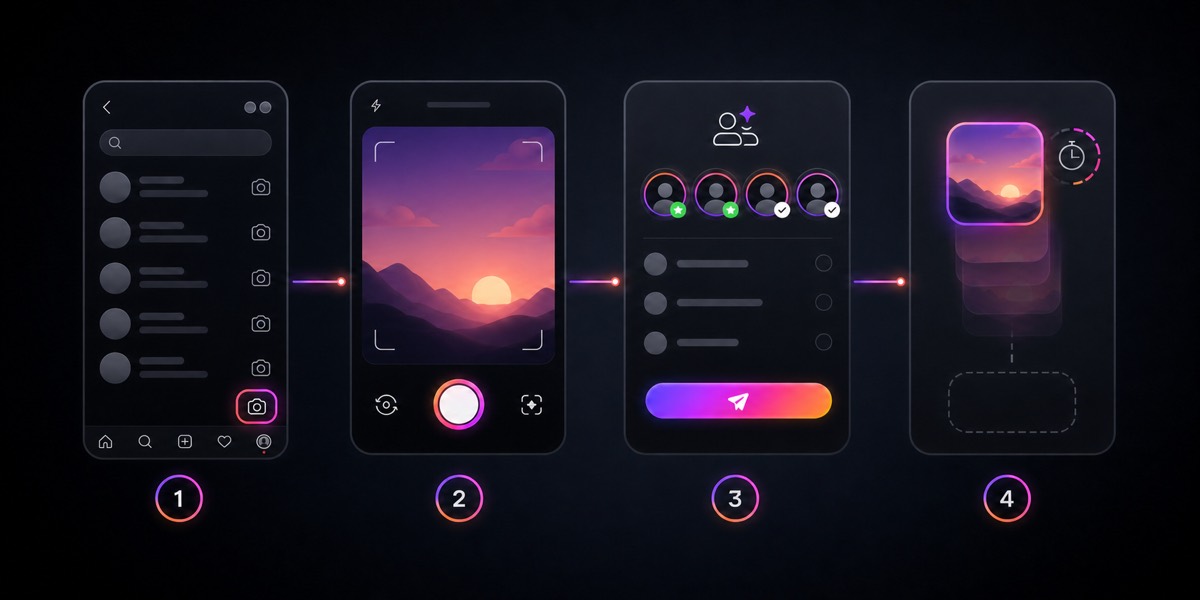
- Open Instagram and head to your inbox.
- Spot the Instants entry point, usually a mini pile of photos near the bottom-right corner.
- Take a real-time photo.
- Add a caption if the photo needs context.
- Pick your audience and send.
Once someone opens your Instant, it is gone. If nobody opens it within 24 hours, it expires.
A few details worth knowing:
- Recipients can react with emoji, reply, or send an Instant back. It is not one-way.
- You get a private archive of every Instant you sent, saved for up to a year. Only you can see it.
- You can compile old Instants into a recap and post that recap to your Stories, but only if you choose to.
The archive is useful because it means you can share freely and decide later what to keep or resurface.
Here is a quick-reference table:
Where Instagram Instants appear
Instants live inside the Instagram inbox. The inbox is already where private conversations, shared posts, and DM replies happen, so the placement makes sense.
You will typically find Instants through:
- the Instagram inbox itself
- a mini photo-stack icon
- a reply or reaction from someone who sent you one
- the standalone Instants app, if it is available in your country
If you do not see Instants yet, that does not necessarily mean something is wrong. Instagram rolls out features unevenly. Availability depends on your region, account type, app version, and device.
Who can see your Instagram Instants?
Instagram Instants are not public posts. They go to Close Friends or followers you follow back, depending on which audience you select before sending. That is a much smaller circle than a Story.
Check the audience before you send, especially if the photo includes your face, location, or anything you would not want forwarded.
Can people screenshot Instagram Instants?
Instagram says friends cannot screenshot or screen-record Instants you share. That is a useful privacy control, but it is not bulletproof. Apps can block screenshots within their own interface, but they cannot prevent someone from photographing a screen with a second device.
For everyday moments like a quick selfie, something funny on your desk, or a casual check-in with close friends, Instants are perfectly fine. For anything truly sensitive, the same rule applies as everywhere else online: if someone else can view it, you no longer fully control it.
Can you see who viewed your Instagram Instants?
Meta's announcement describes Instants as a private sharing feature with replies and emoji reactions, not as a public content format with creator-style analytics. If view or reaction signals appear in your account, treat them as lightweight activity cues, not as metrics to optimize.
How to delete, undo, or get rid of Instagram Instants
Meta lists a few built-in controls for Instants. Here are your options, roughly in order of urgency:
Undo. Instagram says you can take back an Instant before friends see it by tapping undo. This is your best option and the window is small, so act quickly.
Delete from archive. You can also remove an Instant from your personal archive, which unsends it to anyone who has not opened it yet. If they already opened it, deleting from the archive does not help. The photo already did its job.
Snooze incoming Instants. Getting too many? Hold down the pile of Instants in your inbox and swipe right to temporarily mute them. To bring them back later, hold down the same spot and swipe left. Simple toggle.
Mute, restrict, or block. If the problem is a specific person, use Instagram's existing controls. Muting stops their content from bothering you. Restricting limits their interactions. Blocking removes them entirely. These are not new tools. They just apply to Instants too.
If you want to turn off Instants entirely: Instagram may not offer a single universal "kill switch" for every account. Check your settings for notification controls, snooze options, and privacy preferences.
If you sent something by mistake, use undo immediately. Then message the person directly if needed. Disappearing features help, but they are not a substitute for checking before you send.
Why are Instants unavailable on my device?
Instants may not appear the same way for every account or device. Common reasons include:
- Your app is not updated. Start here before assuming anything is broken.
- The standalone Instants app is not in your country yet. The in-app feature is global, but the separate app is rolling out selectively.
- Instagram has not surfaced the entry point clearly for your account yet. New features can appear differently across accounts during rollout.
- Your account settings may affect how the feature appears. Teen Accounts, supervision settings, and safety controls can change the surrounding experience.
- Your device or OS is too old. Some features require recent software.
Try the basics first: update Instagram, restart the app, check from another account, and give it a few days. If the standalone app is not available in your country yet, you may still be able to use Instants inside Instagram.
Safety and teen settings
Instagram is not shipping Instants without guardrails, especially for younger users. Meta says Instagram's existing safety and privacy protections apply to Instants, including Teen Accounts and Family Center supervision.
All of Instagram's existing safety tools apply: block, mute, restrict, reporting, and content filters work the same way inside Instants as they do everywhere else on the platform.
For teen accounts, the protections go deeper:
- Time spent in Instants counts toward a teen's Instagram daily time limit.
- Sleep Mode applies. Notifications are muted and access is restricted by default from 10 PM to 7 AM.
- If a parent already supervises a teen through Instagram's Family Center, that supervision extends to Instants automatically.
- Parents get notified the first time a supervised teen downloads the standalone Instants app.
The main takeaway: Instants uses Instagram's existing safety system rather than operating as a totally separate, unmoderated space.
Instagram Instants vs Stories vs Snapchat vs BeReal
Here is a practical comparison:
Snapchat and BeReal are still different products with their own habits and audiences. Instants gives Instagram users a way to share privately and casually without leaving the app.
Final takeaway
Not every photo needs an audience. Some just need a friend.
Use Instants for the moments that are too small for a Story but worth sharing. A funny sign you walked past. Something your dog did. A quick check-in with someone you are thinking about.
For practical purposes: send Instants only to people you trust, double-check the audience before sending, and use undo or snooze when you need to. If you do not want Instants at all, look for snooze, mute, and notification controls in your settings.
If you are not sure whether to try them, send one to a close friend. That is what they are built for.
Written by

Co-Founder
Adam is the Co-Founder of QwryAI, where he drives the company's mission to transform customer support through AI. He writes about AI strategy, customer experience, and how businesses can leverage automation to scale operations effectively.
Frequently asked questions
Common questions about the ideas covered in this article.
Instagram Instants are real-time, disappearing photos that can be shared with Close Friends or followers you follow back through Instagram or the Instants app.
You take a live photo, add an optional caption, choose who can receive it, and send it. Instants disappear after being opened and expire after 24 hours.
Instagram describes Instants as shareable with Close Friends or followers you follow back, depending on the audience selected before sending.
Instagram may not offer one universal off switch for every account, but users can look for controls such as undo, delete, snooze, mute, restrict, block, or notification settings.